Volume 27, Number 1
Heejin Chang1 and Scott Windeatt2
1University of Southern Queensland, Australia; 2Newcastle University, UK
This study focused on procedures for creating, testing, and developing a set of reusable online resources for use in English for academic purposes programmes. The aim of the materials was to help migrants and refugees develop the linguistic and cultural skills, knowledge, and understanding they would need to engage, interact, and collaborate effectively in a multicultural context. Development of the materials involved an iterative process using a three-stage approach:
This article reports on the second stage.
Keywords: open educational resource, OER, usability testing, English for academic purposes, EAP, language and culture
Over the past two decades, the integration of technology into language education has accelerated, supported by the increasing availability of digital open educational resources (OER) created and shared by the global academic community. Engagement with OER in language learning courses can facilitate the acquisition of language and content knowledge by providing information, and instructional and elicitation activities (Burrows et al., 2022). Equally important, however, it can also promote a broad range of learning practices by encouraging learners to experience and explore language through exposure to resources on the Internet and by fostering collaboration among learners (Brook, 2011; Olivier, 2019).
This is the philosophy which underlies the design of an OER book titled Communication Across Cultures (Chang et al., 2025), which has the aim of tackling linguistic, cross-cultural, and digital literacy issues, initially for refugees and asylum seekers participating in English for academic purposes programmes in an Australian university. While the resource provides opportunities to practise and develop relevant language skills, its primary concern lies in supporting cross-cultural communication. This is achieved through activities that prompt reflection on users’ own cultural identities and their perceptions of others, thereby cultivating intercultural awareness and competence (Liddicoat & Scarino, 2013). Recognising that levels of digital literacy among users will vary, opportunities for practising, acquiring, and developing aspects of digital literacy are also embedded in the OER design (Getenet et al., 2024). Intercultural understanding and digital literacy are central to equipping learners for meaningful participation in increasingly globalised and digitally mediated environments.
However, the processes involved in the creation, publication, re-use, and discovery of such an OER nevertheless require a significant engagement with technology and an understanding of how to make use of the digital environment for educational purposes (Borthwick & Gallagher-Brett, 2014; Olivier, 2019). The development of effective OER involves an iterative process of design, creation, assessment, and revision—activities that require continuous feedback from both students and instructors (Tomlinson, 2012). Despite this, there are relatively few studies that report on such analysis at the earlier stages of material creation, such as techniques to identify the effect of presentation, instructions, content, and technology on the usability of materials.
This study addressed this gap by investigating the early design stages of an OER (the textbook Communication Across Cultures). In doing so, we incorporated usability testing to assess how learners interacted with the materials and how these interactions informed iterative revisions. Such analysis and evaluation at these preliminary stages is crucial to identify and correct issues which might impose an unnecessary cognitive load on the learners (Sanders & Lafferty, 2010).
Open educational resources (OER) are defined as “learning, teaching, and research materials in any format and medium that reside in the public domain or are under copyright that have been released under an open license, that permit no-cost access, reuse, repurpose, adaptation, and redistribution by others” (UNESCO, 2019, p. 5). They are characterised as big OER when referring to whole courses of connected materials and little OER when referring to individual shared items such as handouts, images, or presentations (Weller, 2010). Once these materials are made public, OER may be revised, substantially altered, or used for a purpose or by a target audience in a way that may vary to a greater or lesser degree from what was originally intended. This adaptability is central to the concept of OER-enabled pedagogy, which Wiley and Hilton (2018) defined as teaching and learning practices that are only possible or practical in the context of the 5R permissions (retain, reuse, revise, remix, and redistribute). Within this framework, even minor design enhancements—such as interface adjustments—can play a critical role. For instance, a small addition to an OER platform can balance the needs of diverse educational contexts, improving initial usability without overwhelming users who may not require advanced features, as suggested by Sanders and Lafferty (2010). Such design considerations align with the ethos of OER-enabled pedagogy by supporting flexible, learner-centred experiences.
Usability testing is a means of evaluating how well design principles have been implemented in practice in creating materials. It involves observation of those materials in use to identify how the intended users react, how they carry out the intended tasks, whether they encounter any problems, and what might be the likely cause of any difficulties (Barnum, 2020). It is considered a critical stage in producing and revising materials and is usually repeated throughout the development cycle. For example, Doubleday et al. (2011) conducted usability tests on an online resource for teaching anatomy, implemented changes based on the feedback, and then tested again before releasing the materials for general use. Sugar (1999), although his work is dated, emphasised that designers should attribute any user difficulties to flaws in the design and should pay attention to even atypical user behaviours since these reflect individual differences that need to be accommodated. After a testing session, designers are advised to avoid rushing to implement the first obvious fix; instead, they should determine the underlying cause of each problem and consider multiple possible solutions, reflecting and consulting with others before deciding on changes. Barnum (2020) highlighted the importance of considering specified users, goals, and context when evaluating usability.
In the realm of language and culture learning and teaching, these considerations were applied in this study to determine whether users could effectively use the book, whether the material’s goals (language and intercultural communication) were met without overwhelming or confusing learners, and whether the context of use (classroom vs. independent study) could affect how much guidance the material needs to provide. This latter point was vital: a resource used autonomously should have more self-explanatory instructions and supports, whereas in a teacher-mediated classroom, some details can be handled by the instructor.
A significant number of learners today are proficient with digital technologies, especially smartphones, which many use as their primary computing devices. This familiarity influences their expectations and how they interact with educational content. However, while many students may be tech savvy, the technological backgrounds of students can vary widely, particularly among migrants and refugees, who may not have the same level of access or familiarity with digital technologies. This diversity requires that educational technologies be versatile and accessible in order to cater to a broad range of learners. Kessler and Plakans’s (2001) rationale for student input—recognising learners as stakeholders with individual needs who are influenced by their environment—also underpinned our inclusion of both student and teacher feedback in the design process. By involving these stakeholders in usability testing, we gathered insights on how real users interacted with the OER and how it could be improved to support their learning more effectively. This study also included expert input to further enhance the quality and applicability of the material. It ensured that materials were user-centred and adaptable, which is particularly important for open resources intended for diverse audiences. Guided by these insights, this study posed the following research questions.
R1. How easy do students find it to navigate through the materials?
R2. What features do they find most useful?
R3. What difficulties, if any, do they encounter?
R4. What improvements might they suggest?
This study forms part of a systematic process for designing and developing open-access materials in the form of an online open textbook, a format which has been adopted in order to exploit the range of affordances the medium offers beyond that of a printed textbook. The initial development involved a collaborative, iterative approach: after the first draft of the materials was created, it underwent expert evaluation, followed by user testing with target learners, prior to a large-scale rollout. This study examined the application of a usability testing framework to the second stage, involving two usability testing groups to identify issues related to the format and content that needed addressing before wider release, using a co-discovery approach (see Procedure).
This stage in the study was concerned with the application of a usability testing framework to investigate issues that might need addressing before releasing the materials to a wider audience. Following a critical evaluation of the materials by expert educators, users representative of the target audience worked through a sample of the amended materials, and their reactions were recorded by means of observation, interviews, and written comments, following which possible improvements to the materials were identified.
The materials were designed and developed to be used as the intercultural communication component in English for academic purposes and other language courses. They were hosted on the open Pressbook platform (https://pressbooks.com), which provides features not commonly found in traditional printed textbooks used for teaching and learning English as a foreign or second language.
The content was composed of three modules, and the aim was for the learners to enhance their knowledge and skills in three areas: language proficiency, cultural knowledge, and digital literacy. Each module had 7 or 8 video, audio, or reading tasks which involved watching, listening, and reading, and the production of written or recorded spoken responses. Sixty-eight activities were designed to facilitate interactivity through collaborative learning experiences where students interacted with peers to complete tasks, solve problems, and communicate in the target language.
To mirror real-world language use, contexts, and interactions, the materials included tasks that involved learners cooperating to produce both spoken and written answers, using their individual experiences. They incorporated videos, articles, and images to create personalised multimodal learning experiences.
The development of the materials in the book progressed through three stages. The first stage was characterised by an iterative process of drafting, revising, and refining to ensure the content’s quality, pedagogical soundness, and alignment with the project’s goals. This phase involved close collaboration over the course of a year with a multidisciplinary team that included two researchers in computer-assisted language learning (CALL), one specialist in cross-cultural communication, and two librarians with expertise in OER. In the initial four months, the team held regular meetings to collaboratively shape the content and design of the materials. Then, building on the feedback and structure established in the first module, the same process was applied to the development of the remaining two modules—each undergoing its own cycle of drafting, circulation, and revision to maintain consistency and quality across the full set of materials.
The second stage involved usability testing with small groups of target users, which included two end-user groups: students and teachers. Feedback was collected through two group test sessions with six students as the target audience and two language teachers. Further details on these sessions can be found in the Procedure section. This study focused on the second stage that occurred prior to a broader assessment (stage three).
The materials were developed for students and English as a second language (ESL) and English as a foreign language (EFL) teachers engaged in English for academic purposes (EAP) programmes.
In usability testing, practical considerations suggest that involving around five to six participants provides the optimal balance, resulting in meaningful insights without encountering diminishing marginal returns (Nielsen & Landauer, 1993). For this study, recruitment was announced in the classroom, and six students—forming two groups of three—volunteered to take part in the usability testing process. These six were EFL students at an Australian university. They were from a variety of first language (L1) backgrounds (Congo, Iraq, Bhutan, Japan, and Columbia), studying for 10 hours per week on a 10-week academic skills course as a part of an EAP programme. Four of these students were refugees, and one was a migrant, all with interrupted prior education, while one was an international student. Their level of spoken English ranged from pre-intermediate to intermediate level (CEFR B1 to B2, according to the Common European Framework of Reference for languages). By involving a mix of participants, we ensured that feedback was obtained from those who would truly benefit from improvements—including learners who might struggle with digital literacy or cultural content due to their backgrounds.
To gather feedback from educators experienced in teaching ESL students, two teachers were contacted and invited to review the materials independently at their convenience. Both were experienced in teaching EAP or ESL to international and refugee students. One teacher had taught exclusively in Australia, while the other had taught in multiple countries. They had more than 10 years of experience each in teaching English to ESL/EFL students and were familiar with using technology in their teaching. They were not given specific evaluation criteria, to elicit honest, holistic impressions similar to how an instructor might appraise a new resource when considering it for adoption. Their feedback would help identify any issues from an instructor’s viewpoint (e.g., suitability of content, clarity of instructions for classroom use, and potential challenges for lower-level students) and suggest ways to make the material more teacher-friendly.
The usability testing procedure was adapted from a number of approaches (Barnum, 2020; Dumas & Redish, 1999; Kessler & Plakans, 2001, p. 17; Rubin & Chisnell, 2008, p. 306) and employed a variety of methods to gather data on user experience:
All student activities took place in a 1-hour workshop session. Students were briefed at the start to use the materials as if they were learning from it, while thinking aloud and discussing with their group. Each group of three students shared a computer, which encouraged collaboration (a co-discovery approach where they could help each other and react together). We circulated at a distance, observing but not interfering, except to note any obvious sticking points (e.g., trouble finding a section). This setup allowed us to capture spontaneous-use behaviours and peer discussions about the material. Among the group members, roles such as note-taker, materials navigator, and discussion leader were assigned and emerged organically rather than through explicit instruction. This approach aligns with Barnum’s (2020) suggestion to avoid dominance by any one participant and to encourage balanced participation within the group.
After approximately 40 minutes of exploration and a group discussion, students spent 10—15 minutes writing individual comments (guided by a couple of open-ended questions about what they liked, disliked, found easy or hard, and suggestions for improvement). Immediately afterward, we conducted brief (∼10 minute) interviews with the two students who opted to speak rather than write, covering the same questions verbally.
The two teachers conducted their review, and they each went through the materials at their convenience. Table 1 provides an overview of the data sources and which methods each participant group contributed.
Table 1
Data Sources by Participant Type in Stage Two of the Study (Small Target Users)
| Participants | Method | |
| Think-aloud protocol, co-discovery, and self-reporting log | Observation | |
| 6 EAP students (in 2 groups of 3) | Written feedback (4) | Observation notes (2) |
| Follow-up interview (2) | ||
| Group feedback (2) | ||
| 2 ESL teachers | Written feedback (2) | Not applicable |
Note. EAP = English for academic purposes; ESL = English as a second language; Numbers in parentheses = the number of responses provided by participants.
The data were analysed using a usability matrix framework, categorising emerging themes under three foci: design, navigation, and content (Kessler & Plakans, 2001, p. 18) to investigate how the materials were viewed by first-time participants as potential users. The elicited themes were allocated into three core categories, which were further developed into sub-categories as shown in Table 2.
Table 2
Summarising the Three Core Categories and Sub-Categories
| Core category | Sub-categories |
| Design | Visual appeal and layout consistency Interactive elements and multimedia integration |
| Navigation | Ease of use/user-friendly interface Functionality (search, bookmark, note-taking, progress tracking) Links Cross-device compatibility |
| Content | Educational value and relevance (including suitability for autonomous vs. classroom use) Interaction Cultural sensitivity and inclusivity Task instruction |
All data were labelled with these codes. For example, a comment such as “the text is too dense in sections” was tagged under design—visual layout, whereas “I wasn’t sure where to click first” was tagged under navigation—ease of use. Some feedback touched multiple areas and was coded accordingly. We iteratively refined the coding scheme: initial codes were drawn from the research questions and expected issues (e.g., navigation difficulty, corresponding to question R1), but additional themes were added as needed (e.g., several comments mentioned notetaking, which we grouped under navigation–functionality).
To enhance reliability, the analysis incorporated triangulation across data sources. We compared what was observed (behaviour evidence) with what the participants said. For instance, if observation notes indicated a student struggled to find a module, we checked if the student or others mentioned navigation in their comments. In most cases, there was alignment, but triangulating helped verify that certain issues were genuine (noticed both by users themselves and by observer). The diverse sources (written, oral, and observed) allowed cross-validation of key findings. While we did not employ an independent coder, we discussed the coding framework to ensure the categories made sense and captured the data without major biases.
The analysis prioritised identifying recurring themes (mentioned by multiple participants) as well as notable unique feedback. Given the modest sample size, we were cautious not to overgeneralise, but if both groups of students and a teacher all pointed to the same issue (e.g., need for more instructions), we considered that a strong indication that design change was needed. Conversely, if one participant had a singular suggestion (e.g., integrating a particular tool), we noted it but weighed it in context (perhaps as a lower priority or a future enhancement).
Finally, to address the research questions explicitly, we mapped the themes and sub-categories back onto the individual questions. R1 (ease of navigation) corresponded mostly to the navigation category results; R2 (useful features) corresponded to positive findings in design and content (what they liked, e.g., multimedia); R3 (difficulties) corresponded to any negative issues across all categories; and R4 (suggested improvements) was drawn from the suggestions participants made, often directly tied to the difficulties.
The results are organised below by the three core categories (design, navigation, and content) for coherence. Direct quotes from participants are provided to illustrate each theme.
One teacher participant commented that, “The use of headings, subheadings, and bullet points helps to create a clear visual hierarchy.” Students likewise appreciated the structured appearance. However, a few sections were described as “somewhat crowded,” and participants in one usability testing group found the text too dense in certain sections. They suggested incorporating more visuals or breaking up text with videos and/or images to maintain interest. This suggestion was later incorporated into a revised version of the materials, which expanded a single page of text into multiple pages incorporating multimedia activities, as shown in Figure 1.
Figure 1
Example of Revised OER Materials: From Single-Page Text to Interactive Multi-Page Design
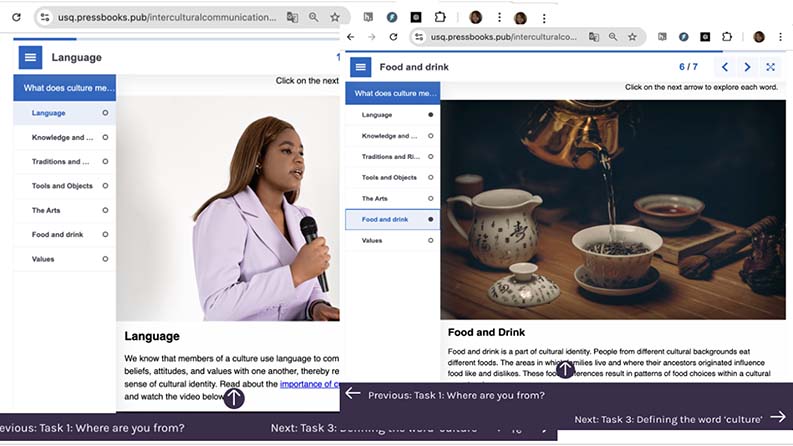
Note. Top panel lists the topics to be covered in Task 2: Language and Culture. The smaller panels are examples of activities covering two of those topics — Language and Food and Drink.
The participants (students and teachers) responded very positively to the presence of icons and images that signalled different activities (reading, listening, reflection, etc.). They found them effective, noting, “I like to pictures [icons], very useful and look nice” and “It’s beneficial to see different images, as they make it easier for the students to understand what to do.” However, one area for improvement in design consistency was identified: some icons were not used uniformly. The tasks involving speaking/recording and the end-of-module learning journal lacked an icon. A teacher noted, “I noticed that each module ends with a learning journal. Including an image similar to those used for other tasks would help readers recognise the consistent structure.”
All participants were positive about the interactive elements. One teacher said, “Quizzes and multimedia content enhance engagement and understanding.” Students in both groups echoed this: they described the interactive quizzes as challenging but motivating, and found the video clips “very interesting.” Three students stated they would like to see more of these kinds of material. During the workshop, it was observed that both student groups attempted the embedded quiz questions while using online dictionaries and discussing answers among themselves. Students also commented favourably on tasks that let them record themselves speaking: “Recording many times is good,” and “Listening my recording is good to know what mistake I made.” Additionally, another student, who had taken part in video recording activities in the EAP course, suggested that “video recordings would be even more beneficial like what we did, VoiceThread.” They saw potential for even richer interactive practice (VoiceThread is a platform for video and voice discussions) beyond what was included. These reactions suggest that the integration of multimedia (video, audio) and interactive tools (H5P activities, recording, and note-taking) was a strength of the design.
Feedback on the overall navigation structure of the materials was generally positive, with some caveats for first-time users. Several commenters praised the interface. For example, a student noted, “There is a table of contents [on the left], which makes the book [structure] easy to access.” A teacher similarly appreciated that the modules and tasks were “easily accessible” via the sidebar menu and hyperlinks. Those remarks suggest that once users noticed the navigation menu and links, they found it intuitive to jump between sections.
However, challenges were observed, particularly at the beginning of the workshops. Two students seemed unsure about how to start navigating. One student clicked around randomly on various headings, possibly overwhelmed by the options. This was corroborated by a student: “At the beginning, I wasn’t sure what to do, what to click. It’ll be much easier, if we work with the teacher.” This indicates that first-time users might need a brief orientation. In practice, one group’s confusion was resolved after a few minutes as they discussed among themselves and realised how the content was structured. In contrast, a student in the second group, and the teachers, described the interface as “intuitive.” This difference could be due to individual familiarity with e-books. Some users will immediately understand a digital book layout, while others will benefit from guidance.
Results that address R1 (ease of navigation) show that generally, the navigation was easy, but initial orientation could be a challenge. A potential solution (suggested implicitly by the feedback) would be to include a brief tutorial or guide at the very start of the book. In a classroom setting, a teacher could carry out this introduction.
The search function was useful for finding specific topics or keywords. Despite the positive reception, however, feedback from a student and a teacher suggested that the addition of highlighting tools would further improve the effectiveness of these resources. A few students experienced issues with “saving and accessing their notes” and a teacher pointed out that: “[recording and written answer] files [for the tasks] are not automatically saved, which is a nuisance because it requires manual saving on their computer.” This is indeed a limitation of using the OER platform outside a learning management system (LMS)—data is not stored between sessions. These comments highlight that while the existing functionality was appreciated, enhancements could greatly improve usability. A teacher suggested features such as a bookmark to remind students where they left off or a progress indicator for completed sections. These are common in a LMS, but Pressbooks does not have such features. Although implementing progress-tracking enhancements may be beyond the scope of content development, acknowledging them is important.
One specific positive observation was how some students discovered the link “Listen to this section,” which is an audio option in one of the tasks (a clickable accessibility feature to hear the text read aloud). They pointed out that listening to the correct pronunciation of words was helpful for improving their listening and speaking practice. This suggests that it would be worth exploring other facilities for enhancing interactivity (e.g., text-to-speech or speech-to-text) to better meet users’ needs and improve usability.
There were no reports of broken links. However, during the observation, one group had trouble with a video in module 3, task 4. The student who was navigating the book on behalf of two other students clicked on the link several times, apparently unsure whether there was a problem with slow downloading or whether the link was broken. Slow downloading turned out to be the problem rather than an issue with the link itself. We realized that an embedded loading indicator or a note such as “Video may take a moment to load” could alleviate confusion. It is a minor point, but it affected the flow for that group until they figured it out.
The ability to access materials on a variety of devices, including desktops, tablets, and smartphones, was praised as it provided flexibility. One student commented, “I accessed the book with my phone while I was on the bus [after the workshop]. It was good to watch the videos and do some tasks.” This spontaneous feedback was encouraging—it means the responsive design worked, and students appreciated the flexibility of being able to study on-the-go. No one reported any layout breakages or difficulties on mobile, so it appears the responsive design considerations (stage one actions) were effective.
Both students and teachers regarded the content of the book as valuable and relevant to their needs. Participants noted that the materials covered a range of cultural topics from general concepts (e.g., definitions of culture, culture shock) to specific real-world scenarios (e.g., challenges). The students in the workshops claimed that as in the examples in the materials, they had had experiences of being treated differently by people, which made them “angry” or led to “frustration,” or “missing [their] home [countries].” One student said in the workshop, “She [a character in a video] is in a similar situation .... I had the same experience.” This indicates the content successfully prompted learners to make connections to their own lives, a key goal for intercultural learning. They also commented that, as a result, they acquired some strategies for coping in such situations, stating, “It is good to know how to deal with. I fought when I had similar experience in the school,” which implies previously they might have responded aggressively.
One teacher found the topics appropriate, though another cautioned that some topics could be “quite sensitive” to handle in class depending on students’ language proficiency. For beginner-level learners, discussing complex intercultural issues might be challenging since they may lack the vocabulary to express their opinions. The teacher added, “Honestly, I’m not sure how to start discussing this issue, and I don’t believe it’s my job.” This comment reflects a concern some teachers have: facilitating intercultural discussions can be delicate, especially if issues stray beyond language teaching into personal territory.
Participants also reported that the embedded links provided in various tasks in each module were useful. The students expected, according to their comments, that these would help them “expand” their knowledge of the topics. The teachers pointed out that the materials could “offer alternative sources” to meet the needs of different cohorts. Regular updates and expansion of these resources could further benefit users. This affirms that including ease of updating and external resources is a strength of OER, as long as technical access is smooth. Also, this flexibility is indeed one advantage of OER—teachers or learners can pick and choose or extend content as needed.
The students in the workshops highlighted the videos and recording tasks as providing effective opportunities for them to practice strategies for improving their English. Encouraging students to research definitions on their own was also considered a good strategy for enhancing academic skills. One student stated, “I like this task, research, anyway we have to do in university study, so it is helpful.”
Some challenges were identified by the participants. For example, the quiz in module 2 was reported to be quite difficult to understand and required more explanation. Also, task 1 in module 1 was noted to be overly “technical,” which might be challenging for users with limited digital literacy.
The tasks that included videos were the most engaging. Participants commented positively on tasks that included real-life examples and personal stories, which tended to enhance their interest and motivation. During the workshop, students interacted and communicated with other students, sharing their opinions and experiences. One student confessed to the others, “[In the video], she is in a similar situation, yeah, I think she is right. I had the same experience.” They appeared to appreciate these kinds of material, as they clicked and watched until the video finished. This interactive approach may not only provide a more dynamic learning environment but also encourage students to relate the material to their own lives, which may help deepen their understanding of and interaction with the content.
Overall, multimedia elements appeared to be highly effective in aiding understanding, with videos and interactive tasks receiving particularly positive feedback. Students commented that they “like videos, easy to understand” because they are “more interesting” than just reading or listening. During the workshop, we noted that most of the videos were watched and provoked some discussion and while they were watching them, students clicked subtitles to read, paused, and returned to watch again.
The use of multimedia is an important feature of the materials and proved popular with users. Further expanding these elements and ensuring they are seamlessly integrated into the content is therefore likely to enhance learning outcomes.
An important aspect of content for this project was ensuring cultural inclusivity. The content seemed to be generally culturally sensitive and inclusive, recognising and respecting diverse perspectives. Participants expressed satisfaction when they saw videos and reading materials that represented their cultural backgrounds and perspectives. One student commented, “The stories and examples are from different cultures and my own. And that is true in general what they said.” A teacher also commended the selection of videos and images that represented “various races.” Such positive feedback is crucial, as one risk in the development and use of intercultural materials lies in the inadvertent privileging of one culture or the misrepresentation of cultural perspectives. This inclusivity likely enhanced interaction as well. When learners see themselves or their experiences validated in learning materials, it can increase motivation and trust in the material. The feedback underscores the importance of incorporating diverse cultural perspectives in educational materials to enhance relatability and interaction among students (e.g., migrants, international students, and refugees).
Clear task instructions are essential for students and teachers, whether using this material independently or in the classroom. Feedback on the instructions was mixed. Some participants (both students and one teacher) commented that there was a need for more detailed instructions. A teacher indicated that some words with multiple meanings, such as “demonstrate,” might confuse learners. The recommendation was to use simple, common language to avoid misunderstandings, particularly if this book is to be used for self-study. Another teacher suggested including examples under the instructions to guide students on how to start their tasks. On the other hand, a few students cautioned that overly detailed instructions might cause readers to “lose interests” and become “demotivated” before even attempting the task. This reveals a tension: lower-proficiency learners might need step-by-step guidance, whereas others prefer brevity to maintain motivation.
Additionally, while “making notes in a notebook” is beneficial for some students, others find “typing answers is easier” because it allows them “to copy, delete, and check spelling.” Writing on paper has certain advantages, but it is also “easy to lose.” This comment actually pertained to task format (writing by hand vs. typing in the digital book), but it also connects to the instructions, which encouraged students to take notes on paper. The first ones followed that instruction literally and liked it, whereas the second group found their own way, typing digitally, implying the instructions might need to accommodate multiple modes or at least not mandate one way.
Despite these variances, most agreed that the language of the instructions was generally clear and understandable (no one reported not understanding what to do). The main issues were about scope and how much guidance to include. A suggestion made by one teacher to address this was to include a simple example for complex tasks. For instance, under a reflection question, provide a one-sentence example answer to illustrate what is expected. This idea was positively received by the researcher and implemented to help users get started without over-explaining in the main text.
The usability testing answered our research questions and provided actionable insights. While there was general agreement about the materials among participants, differences highlight the importance of considering both the context in which educational materials are used and the individual learners and teachers when interpreting feedback and making subsequent revisions.
The study found that once familiar with the interface, students and teachers could navigate the materials with relative ease. The table of contents and module structure were effective in guiding users by providing multiple navigation pathways. However, initial confusion experienced by some students needs to be taken into account. This highlights a key point from the feedback: the context in which materials are used influences perceived usability. If a teacher is present (classroom context), they can introduce the resource and thus mitigate navigation issues. In an independent study context, the material itself should provide that orientation. This consideration of context underscores the importance of aligning the design of educational materials with their intended use (Laurillard, 2012).
Because our materials as OER might be used either with or without a teacher, we need to ensure it serves both. In practice, we have considered including a quick-start tutorial for independent users. This minor addition could balance the needs of students in different contexts, thus improving initial ease of use without overloading the interface for those who do not require it, as noted by Sanders and Lafferty (2010).
Participants valued the interactive and multimedia features of the resource. The positive reactions to videos, quizzes, and recording tasks confirm that these elements enhanced interactions and learning. This posits that well-integrated verbal and visual materials can improve understanding. The open-book format enabled these features, illustrating the advantage of OER-enabled pedagogy (Wiley & Hilton, 2018) that leverages openness and technology to create more engaging learning experiences. Student collaboration around quizzes and discussion of video content, for example, demonstrates active learning, which Kessler and Plakans (2001) emphasised by involving learners as stakeholders in materials evaluation. The findings support the idea that learners, when given interactive content, often take the initiative (e.g., by using dictionaries or replaying videos) to deepen their understanding. This aligns with the concept of self-directed learning in OER (Olivier, 2019) and shows that digitally literate learners will use the tools at hand to aid their learning.
One interesting point is that certain features had a dual nature: for example, the note-taking method. The resource allowed typing notes, but some students chose to write on paper. This highlights individual preferences in how students interact with content. As Mueller and Oppenheimer (2014) found, writing notes by hand can have cognitive benefits for some, while others prefer the convenience of digital notes. Given these differing preferences, it may be advantageous to encourage learners to experiment with both methods to discover what works best for them. Additionally, providing materials in multiple formats—such as printable worksheets for those who prefer to write by hand—could help accommodate these varying preferences, especially if a digital book is used in a classroom setting.
As is often the case in deliberative settings, one of the notable aspects of the comments was the presence of disagreements and apparent contradictions among participants. For example, while some experienced difficulty in processing some of the written information in particular, others appreciated the clarity that such details provided. This dichotomy suggests that there is no one-size-fits-all approach to the design of instructional materials. The challenge for educators and course designers lies in balancing these opposing needs. Ideally, providing tiered instructions—where learners and teachers can choose between a basic outline or a more detailed guide, depending on their comfort level and prior knowledge—could address these differences. The effect of these individual differences is directly mirrored in the work of Kessler and Plakans (2001) who pointed out that learners are individuals and are affected by their environment.
The usability issues encountered often traced back to individual differences rather than universally poor design. This does not mean we should dismiss them; rather, it means the design should strive for flexibility. The positive side is that because this OER is in a digital format, we have more leeway to adapt and iterate than with a print textbook. We can refine instructions, add alternative pathways, or provide additional resources to cater to different needs.
Another difficulty was technical friction, such as the lack of a note-saving feature and the impression of a broken link due to slow loading. These are reminders that technical usability (e.g., interface design, performance) is as important as content usability. Slow Internet or lack of an auto-save feature are external to content but internal to user experience. For our project, this suggests that when deploying an OER, considering the technological infrastructure of our learners (e.g., Internet speed, device usage) is crucial. In contexts where connectivity is an issue, common for some refugee learners, we should provide low-bandwidth alternatives, such as downloadable PDFs, to ensure those technical difficulties do not impede learning. Sanders and Lafferty (2010) emphasised that effective e-learning requires attention to such usability details to avoid cognitive overload with the medium itself.
Participants were not short on suggestions, and importantly, many suggestions were actionable and lined up with best practices. The call for features such as highlighting, bookmarking, and progress tracking indicates that users expect a digital learning experience to have personalisation capabilities. Moreover, the desire for such features shows a level of engagement where learners want to interact more deeply with the materials. This is encouraging because if we supply the means, learners are inclined to actively study the content, not just passively read it.
Another improvement suggestion, though implicit, was to keep content updated and consider alternative content if something does not work. This speaks to the sustainability of OER materials. Unlike a traditional textbook that might go unchanged for years, open materials benefit from continuous improvement. Our plan to periodically update links, add new case studies or videos, and incorporate user feedback is aligned with the OER ethos of iterative enhancement (Wiley & Hilton, 2018). Regular updates can also address any future usability issues that arise as technology or student expectations change.
This study provides an example of applying usability testing to the development of open educational resources and is consistent with other studies emphasising the importance of incorporating usability testing into resource design prior to full implementation (e.g., Doubleday et al., 2011; Kessler & Plakans, 2001).
As curricula and course details undergo modification, it is likely that instructors will seek to modify existing online resources to be more closely aligned with changing course goals or formats. Many classrooms may also increasingly rely on online resources for reinforcement or delivery of content, and priority must be given to testing resource interfaces and to assessing a student’s ability to quickly and appropriately navigate through a system. A follow up to this study will investigate the effectiveness of student learning while using the resources.
As more educators attempt to develop technology-based materials, it is important to ensure the appropriateness and usability of these materials, especially to reduce the considerable cognitive load imposed on students by language, content, and technology. The involvement of students in the development process proved to be valuable, and the testing procedures employed in this study represent one of many approaches that may be used to involve students in assessing the usability of materials.
This project is funded by the Open Education Practice Grant, part of the Learning and Teaching Grants Program at the University of Southern Queensland.
Barnum, C. M. (2020). Usability testing essentials: Ready, set... test! (2nd ed.). Morgan Kaufmann.
Borthwick, K., & Gallagher-Brett, A. (2014). “Inspiration, ideas, encouragement”: Teacher development and improved use of technology in language teaching through open educational practice. Computer Assisted Language Learning, 27(2), 163-183. https://doi.org/10.1080/09588221.2013.818560
Brook, J. (2011). The affordances of YouTube for language learning and teaching. Hawaii Pacific University TESOL Working Paper Series, 9(1, 2), 37-56. https://hpu.edu/research-publications/tesol-working-papers/2011/9_1-2_Brook.pdf
Burrows, K. M., Staley, K., & Burrows, M. (2022). The potential of open educational resources for English language teaching and learning: From selection to adaptation. English Teaching Forum, 60(2), 2-9. https://americanenglish.state.gov/files/ae/60_2_pg02-09_cx2_corrected.pdf
Chang, H., Windeatt, S., & Stockwell, E. (2025). Communication across cultures. University of Southern Queensland. https://usq.pressbooks.pub/interculturalcommunication/
Doubleday, E. G., O’Loughlin, V. D., & Doubleday, A. F. (2011). The virtual anatomy laboratory: Usability testing to improve an online learning resource for anatomy education. Anatomical Sciences Education, 4(6), 318-326. https://doi.org/10.1002/ase.252
Dumas, J. S., & Redish, G. (1999). A practical guide to usability testing (rev. ed.). Intellect Books.
Getenet, S., Cantle, R., Redmond, P., & Albion, P. (2024) Students’ digital technology attitude, literacy and self-efficacy and their effect on online learning engagement. International Journal of Educational Technology in Higher Education, 21, Article 3. https://doi.org/10.1186/s41239-023-00437-y
Kessler, G., & Plakans, L. (2001). Incorporating ESOL learners’ feedback and usability testing in instructor-developed CALL materials. TESOL Journal, 10(1), 15-20. https://doi.org/10.1002/j.1949-3533.2001.tb00012.x
Laurillard, D. (2012). Teaching as a design science: Building pedagogical patterns for learning and technology. Routledge.
Liddicoat, A. J., & Scarino, A. (2013). Intercultural language teaching and learning (2nd ed.). Wiley-Blackwell. https://doi.org/10.1002/9781118482070
Mueller, P. A., & Oppenheimer, D. M. (2014). The pen is mightier than the keyboard: Advantages of longhand over laptop note taking. Psychological Science, 25(6), 1159-1168. https://doi.org/10.1177/0956797614524581
Nielsen, J., & Landauer, T.K. (1993). A mathematical model of the finding of usability problems. Proceedings of the INTERCH93: Conference on Human Factors in Computing Systems, The Netherlands, 206-213. https://doi.org/10.1145/169059.16916
Olivier, J. (2019) Towards a multiliteracies framework in support of self- directed learning through open educational resources. In E. Mentz, J. de Beer, & R. Bailey (Eds.), Self-directed learning for the 21st century: Implications for higher education (pp. 167-201). AOSIS Scholarly Books. https://doi.org/10.4102/aosis.2019.BK134.06
Rubin. J., & Chisnell., D. (2008). Handbook of usability testing: How to plan, design, and conduct effective tests (2nd ed.). Wiley. https://content.e-bookshelf.de/media/reading/L-571931-cbc66f3178.pdf
Sanders, J., & Lafferty, N. (2010). Twelve tips on usability testing to develop effective e-learning in medical education. Medical Teacher, 32(12), 956-960. https://doi.org/10.3109/0142159X.2010.507709
Sugar, W. (1999). Novice designers’ myths about usability sessions: Guidelines to implementing user-centered design principles. Education Technology, 36(6), 40-44. https://www.jstor.org/stable/44428569
Tomlinson, B. (2012). Materials development for language learning and teaching. Language Teaching, 45(2), 143-179. https://doi.org/10.1017/S0261444811000528
UNESCO. (2019, November 25). Recommendation on open educational resources (OER). UNESCO. https://www.unesco.org/en/legal-affairs/recommendation-open-educational-resources-oer
Weller, M. (2010). Big and little OER. In Open Ed 2010 Proceedings. Universitat Oberta de Catalunya, Open Universiteit Nederland, & Brigham Young University. https://hdl.handle.net/10609/4851
Wiley, D., & Hilton, J. L., III. (2018). Defining OER-enabled pedagogy. The International Review of Research in Open and Distributed Learning, 19(4). https://doi.org/10.19173/irrodl.v19i4.3601

Usability Testing for an Open Educational Resource to Teach Language and Culture by Heejin Chang and Scott Windeatt is licensed under a Creative Commons Attribution 4.0 International License.